

IntegratD for Boomi vs Boomi OpenTelemetry: Two Very Different Views of Observability
Boomi’s introduction of native OpenTelemetry capabilities gives integration teams a deeper view into what is happening inside the Boomi runtime.
It provides detailed execution information across processes, shapes and runtime components, making it particularly valuable for developers and platform teams investigating performance issues, failures and low-level execution behavior.
IntegratD for Boomi approaches observability from a different direction.
Rather than focusing primarily on what happened inside the integration engine, IntegratD for Boomi focuses on what happened to the business transaction moving through the integration estate.
The difference can be summarized simply:
Boomi OpenTelemetry: tells you what the engine did.
IntegratD for Boomi: tells you what happened to the business transaction.
Those are related questions, but they are not the same question.
Runtime Observability vs Business Transaction Observability
Consider an order moving through an integration process. A developer investigating the execution may want to know:
- Which shapes executed?
- How long did each shape take?
- Which branch was followed?
- How many documents passed through a particular step?
- Where did an exception occur?
- What was happening inside the Atom at that point?
This is where Boomi’s native OpenTelemetry provides significant value.
A support analyst or business operations user usually approaches the same incident differently. Their questions are more likely to be:
- Did Order 123456 complete?
- Where is the order now?
- What payload was received?
- What payload was sent?
- Which business step did it reach?
- Did it move through the downstream systems?
- Can I find it using the order number?
- Did it breach its SLA?
- Who needs to be notified?
Those are the questions IntegratD for Boomi is designed to answer.
For organizations using both, the value is in bringing the two perspectives together: OpenTelemetry provides the technical runtime view, while IntegratD for Boomi adds the business transaction context. Together, they can give teams a more complete understanding of what is happening and help them make better operational decisions.
So where do the two approaches differ in practice? Let’s look at 11 key differences between IntegratD for Boomi and Boomi OpenTelemetry, and how those differences affect developers, operations teams and business users.
1. Full Payload Visibility and Search
One of the biggest differences between IntegratD for Boomi and native OpenTelemetry is payload visibility.
IntegratD for Boomi can capture the complete incoming and outgoing document payload at defined transaction boundaries. Those payloads can then be stored in a searchable payload repository. This changes the support experience significantly.
Suppose a business user contacts support and asks:
“What happened to Order ID 123456?”
The support analyst does not necessarily need to know the Boomi process name, execution ID, exact execution time or even which process handled the transaction.
They can search the payload repository for:
123456
and identify transactions containing that value. From there, they can inspect the related transaction, payload, properties, process information and outcome.
This is particularly useful for:
- operational support;
- replay;
- auditing;
- dispute investigation;
- reconciliation;
- customer service investigations.
Native OpenTelemetry does not provide the full incoming or outgoing business document as part of the telemetry stream.
The Difference
Boomi OpenTelemetry: tells you how the process executed.
IntegratD for Boomi: allows you to find and inspect the business transaction and its payload.
2. A Stable Business Transaction Identity
A runtime execution ID and a business transaction ID are not necessarily the same thing.
One logical transaction may move through:
- multiple Boomi processes;
- subprocesses;
- Try/Catch paths;
- fibers;
- API gateways;
- message queues;
- integration servers;
- downstream applications.
Each technology may create its own execution identifier. That makes end-to-end correlation difficult. IntegratD for Boomi maintains a stable Job/Transaction ID representing the business transaction. An Override Transaction ID can also be supplied, allowing an external correlation identifier to follow the transaction across systems.
For example:
API Gateway → Boomi → IBM MQ → ACE → downstream application
can all be associated with the same business transaction.
Instead of investigating several unrelated execution IDs, the operations team can follow one transaction across the integration landscape.
The Difference
Boomi OpenTelemetry: is execution-focused.
IntegratD for Boomi: is transaction-focused.
3. Boomi Runtime Visibility vs End-to-End Transaction Visibility
Native OpenTelemetry is naturally focused on what happens inside the Boomi environment. That is useful when the problem being investigated is inside Boomi. But enterprise transactions rarely begin and end inside one integration runtime.
A transaction may start in an API gateway, move into Boomi, continue through IBM MQ, be processed by IBM ACE and finally reach a downstream application. Once the transaction leaves Boomi, Boomi runtime telemetry no longer represents the entire business journey.
IntegratD for Boomi is designed to correlate the same business transaction across supported integration layers. The transaction ID becomes the point that links those environments together.
The Difference
Boomi OpenTelemetry: provides deep visibility into Boomi.
IntegratD for Boomi: provides visibility into the business transaction across the wider integration estate.
4. Shape-Level Detail vs Business Checkpoints
Boomi OpenTelemetry
Native telemetry can expose detailed execution information such as:
- shape execution;
- timings;
- document counts;
- branch activity;
- runtime events;
- low-level execution diagnostics.
That level of detail is useful when a developer wants to understand why a process behaved in a certain way.
For example:
“Why did this shape take 1.8 seconds?”
The support analyst does not necessarily need to know the Boomi process name, execution ID, exact execution time or even which process handled the transaction.
They can search the payload repository for:
123456
and identify transactions containing that value. From there, they can inspect the related transaction, payload, properties, process information and outcome.
This is particularly useful for:
- operational support;
- replay;
- auditing;
- dispute investigation;
- reconciliation;
- customer service investigations.
Native OpenTelemetry does not provide the full incoming or outgoing business document as part of the telemetry stream.
IntegratD for Boomi
IntegratD for Boomi operates around meaningful business checkpoints.
A transaction could be represented as:
STARTED → Order Received → Validation Completed → Sent to SAP → Response Received → STOPPED
These checkpoints are deliberately chosen to represent meaningful stages in the business process. IntegratD for Boomi does not attempt to reproduce every internal Boomi shape execution.
The Difference
Boomi OpenTelemetry: provides technical execution detail.
IntegratD for Boomi: provides business process context.
5. Runtime Events vs Explicit Business Lifecycle
Telemetry usually describes activity that occurred. IntegratD for Boomi goes further by defining an explicit transaction lifecycle.
The IntegratD for Boomi model can use states such as:
STARTED → PROGRESS → STOPPED
Developers can then emit meaningful checkpoints within that lifecycle, for example:
- Order received
- Before split
- Validation completed
- Sent to SAP
- Response received
- Completed
These are not simply log messages. They are structured transaction states. That matters because a machine-readable event stating:
Status = COMPLETED
is fundamentally different from parsing a textual message such as:
“Process execution completed normally.”
One is a structured business event. The other is text that must be interpreted.
The Difference
Boomi OpenTelemetry: reports runtime activity.
IntegratD for Boomi: publishes explicit business transaction state.
6. Structured Business Properties
IntegratD for Boomi also treats document and dynamic properties as structured operational metadata.
A transaction can carry information such as:
PropertyExampleCustomer IDCUST-9843Order Number123456CountryCanadaPayroll IDPAY-001File Nameorder_123456.xmlBusiness UnitRetailPartnerSAPTransaction TypeOrder
These properties are linked to the transaction or document. That makes them searchable and operationally useful. A support user can therefore search by a business identifier rather than by a technical execution ID. Properties can also be used to drive operational behavior such as notifications and SLA rules.
The Difference
Boomi OpenTelemetry: exposes technical telemetry.
IntegratD for Boomi: turns business metadata into searchable operational information.
7. Telemetry Data vs Operational Automation
Collecting observability data is not the same as operating the business process. OpenTelemetry produces telemetry that still needs to be consumed.
That means an organization typically needs a backend capable of handling:
- storage;
- dashboards;
- alerts;
- parsing;
- correlation;
- retention;
- search;
- operational workflows.
IntegratD for Boomi includes the consuming operational platform.
Properties emitted by integrations can be used to drive:
- notifications;
- SLA monitoring;
- thresholds;
- escalation;
- breach handling;
- operational dashboards.
Consider a payroll transaction.
The integration could emit:
Payroll ID: PAY-001 Business Unit: Canada Expected Completion: 23:00 Priority: Critical
IntegratD for Boomi can use this information to identify that the transaction is late and trigger the appropriate notification or SLA escalation. That logic does not have to be recreated in every individual process.
The Difference
Boomi OpenTelemetry: gives you signals.
IntegratD for Boomi: turns transaction information into operational action.
8. Developer-Centric vs Business-Centric Observability
The intended audiences are also different.
Boomi OpenTelemetry is most naturally useful to:
- integration developers;
- DevOps teams;
- platform engineers;
- technical support teams.
IntegratD for Boomi extends observability to:
- operations teams;
- application support;
- service managers;
- administrators;
- audit teams;
- business users.
That difference changes the questions the platform needs to answer.
A developer may ask:
“Which shape failed?”
A business user asks:
“Did my order get through?”
A developer may ask:
“What was the execution time of this branch?”
An operations user asks:
“Is the payroll run late?”
A developer may ask:
“What execution ID should I inspect?”
A support analyst asks:
“Show me everything associated with Customer ID 78421.”
IntegratD for Boomi is designed around the second set of questions.
9. Automatic Runtime Coverage vs Deliberate Business Instrumentation
One advantage of native OpenTelemetry is that runtime telemetry can be generated without explicitly adding IntegratD for Boomi monitoring steps to every process. That gives it broad technical coverage.
IntegratD for Boomi takes a different approach. The developer deliberately identifies where meaningful business events should be emitted. That means IntegratD for Boomi only sees the processes and checkpoints that have been instrumented. This is a trade-off rather than the same capability implemented differently.
OpenTelemetry
- automatic runtime visibility;
- broad process coverage;
- no explicit business instrumentation required.
IntegratD for Boomi
- deliberate business checkpoints;
- explicit transaction meaning;
- structured lifecycle and business context.
The Difference
Boomi OpenTelemetry: prioritizes breadth of technical coverage.
IntegratD for Boomi: prioritizes meaningful business context.
10. Failure Visibility
The distinction is also important when failures occur. Native runtime telemetry can expose failures that happen anywhere in the runtime, including failures before a business-monitoring component has executed.
IntegratD for Boomi cannot report a business transaction if the process fails before its initial STARTED checkpoint is reached. Once a transaction has entered the IntegratD for Boomi lifecycle, however, IntegratD for Boomi provides far more business context around what that transaction was and what happened to it.
The Difference
Boomi OpenTelemetry: can expose failures across the runtime.
IntegratD for Boomi: explains failures in the context of the monitored business transaction.
11. Runtime Health vs Business Transaction Health
The word “health” can also mean different things.
OpenTelemetry can help answer:
“Is my Boomi runtime healthy?”
That may involve:
- execution performance;
- runtime events;
- scheduler behaviour;
- persistence;
- container activity;
- errors.
IntegratD for Boomi focuses on a different question:
“Are my business transactions healthy?”
For example:
- Are orders completing?
- Are payroll runs meeting their SLA?
- Are messages reaching downstream systems?
- Are transactions failing at a particular business checkpoint?
- Are specific customers experiencing recurring problems?
A technically healthy runtime does not guarantee that a critical business transaction completed correctly.
The Difference
Boomi OpenTelemetry: measures the health of the integration runtime.
IntegratD for Boomi: measures the operational health of business transactions.
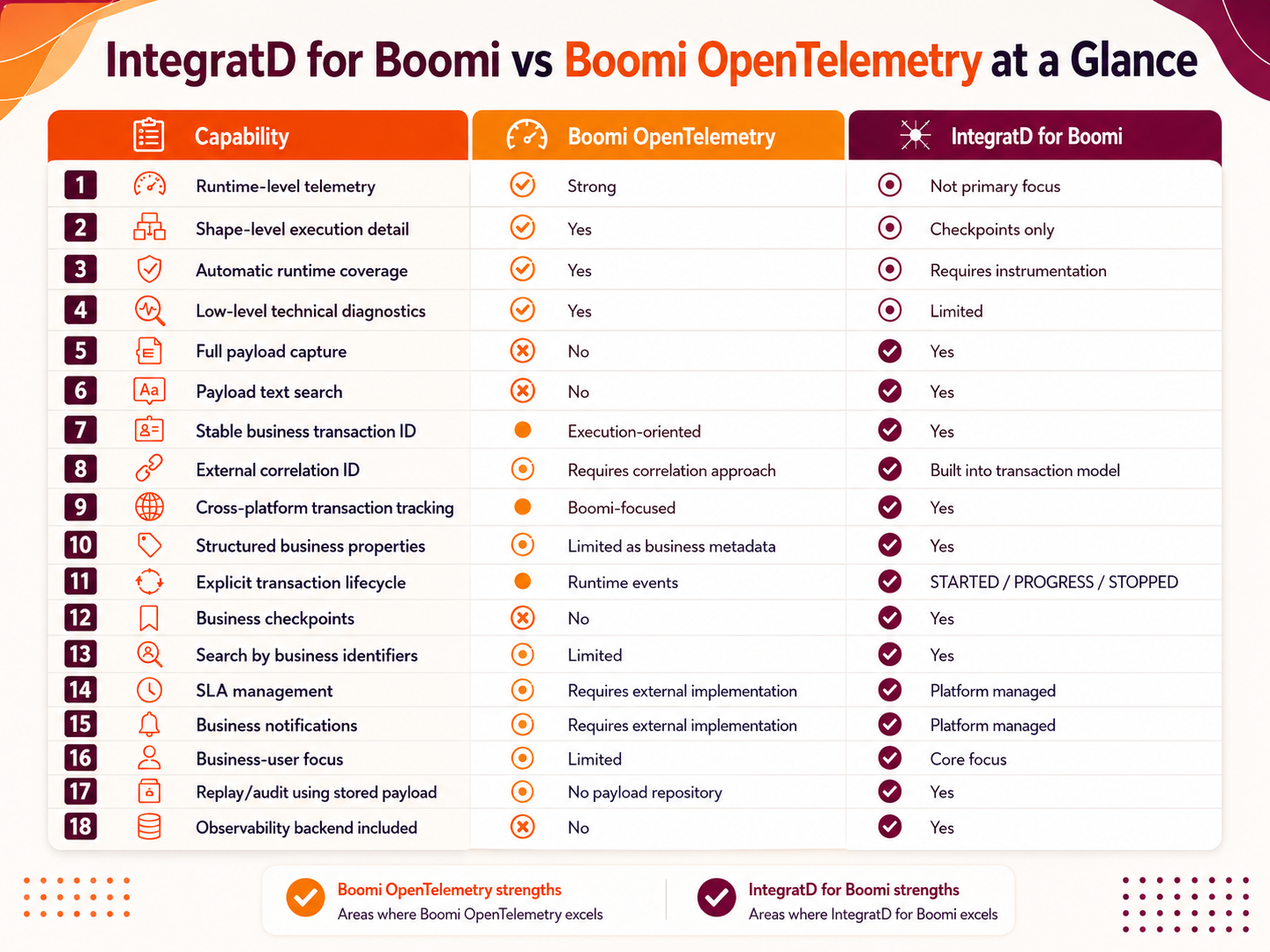
Different Problems Require Different Observability
Boomi OpenTelemetry and IntegratD for Boomi should not be viewed as two implementations of the same monitoring capability. They operate at different levels and answer different questions.
Boomi OpenTelemetry is primarily concerned with what is happening inside the integration runtime.
IntegratD for Boomi is concerned with what is happening to the business transaction moving through the integration estate.
OpenTelemetry is useful when the question is:
“What did the engine do?”
IntegratD for Boomi is designed for the question:
“What happened to my transaction?”
That distinction matters because enterprise observability cannot end with knowing that a shape executed successfully. The organization ultimately needs to know whether the order, invoice, payroll file, payment, claim or other business transaction actually made it through.
For organizations seeking a more complete observability strategy, the strongest approach is therefore not to choose one view over the other, but to bring both together.
Boomi OpenTelemetry provides the technical depth of the runtime. IntegratD for Boomi adds the business transaction context.
Together, they give developers, operations teams and business users a broader understanding of what is happening across the integration landscape, from the performance of the underlying engine to the outcome of the business transaction itself.
This combined view can help organizations diagnose issues faster, understand business impact more clearly, improve operational decision-making and ultimately provide a more complete picture of integration health.
“That is the gap IntegratD for Boomi is designed to address.”
IntegratD for Boomi
IntegratD is our powerful integration solution, designed to enhance and extend Boomi’s capabilities. IntegratD for Boomi seamlessly integrates with Boomi, providing advanced data monitoring and optimization features that improve efficiency, visibility, and performance. As part of the IntegratD suite, this module is built specifically for Boomi users who need deeper insights and enhanced automation within their workflows.